Best Gaming Monitors Under $500 (2025)
Discover the top 5 budget gaming monitors of 2025 with 144Hz+ refresh rates, QHD resolution, and premium features under $500. Complete buying guide included.

Top Budget Gaming Monitors for 2025
Finding a high-quality gaming monitor that doesn’t break the bank can be challenging, but 2025 has brought incredible options under $500. Whether you’re building your first gaming setup or upgrading from an older display, this guide covers the best budget-friendly gaming monitors that deliver exceptional performance, high refresh rates, and stunning visuals.
We’ve tested dozens of monitors across various price points to bring you this comprehensive list. Each monitor has been selected based on refresh rate, response time, panel quality, color accuracy, and overall gaming performance. From competitive esports to immersive single-player experiences, these monitors offer unbeatable value.
1. ASUS TUF Gaming VG27AQ – Best Overall Under $500
The ASUS TUF Gaming VG27AQ dominates our list as the best overall gaming monitor under $500. This 27-inch powerhouse features a gorgeous IPS panel with 2560×1440 (QHD) resolution, delivering crystal-clear visuals that bring your games to life. The 165Hz refresh rate ensures buttery-smooth gameplay, while the 1ms response time eliminates motion blur and ghosting, giving you the competitive edge in fast-paced games.
What makes this monitor truly exceptional is its HDR10 support and 130% sRGB color gamut, providing vibrant and accurate colors that enhance both gaming and content creation. ASUS’s Extreme Low Motion Blur (ELMB) technology works in tandem with Adaptive-Sync to deliver tear-free, stutter-free gaming. The ergonomic stand offers full height, tilt, swivel, and pivot adjustments, ensuring maximum comfort during marathon gaming sessions.
- Display: 27″ IPS, 2560×1440 (QHD)
- Refresh Rate: 165Hz
- Response Time: 1ms (MPRT)
- Special Features: HDR10, ELMB, Adaptive-Sync, ergonomic stand
- Best For: Competitive gaming, content creation, all-around performance
- Check prices on Amazon

2. LG 27GL83A-B UltraGear – Best Color Accuracy
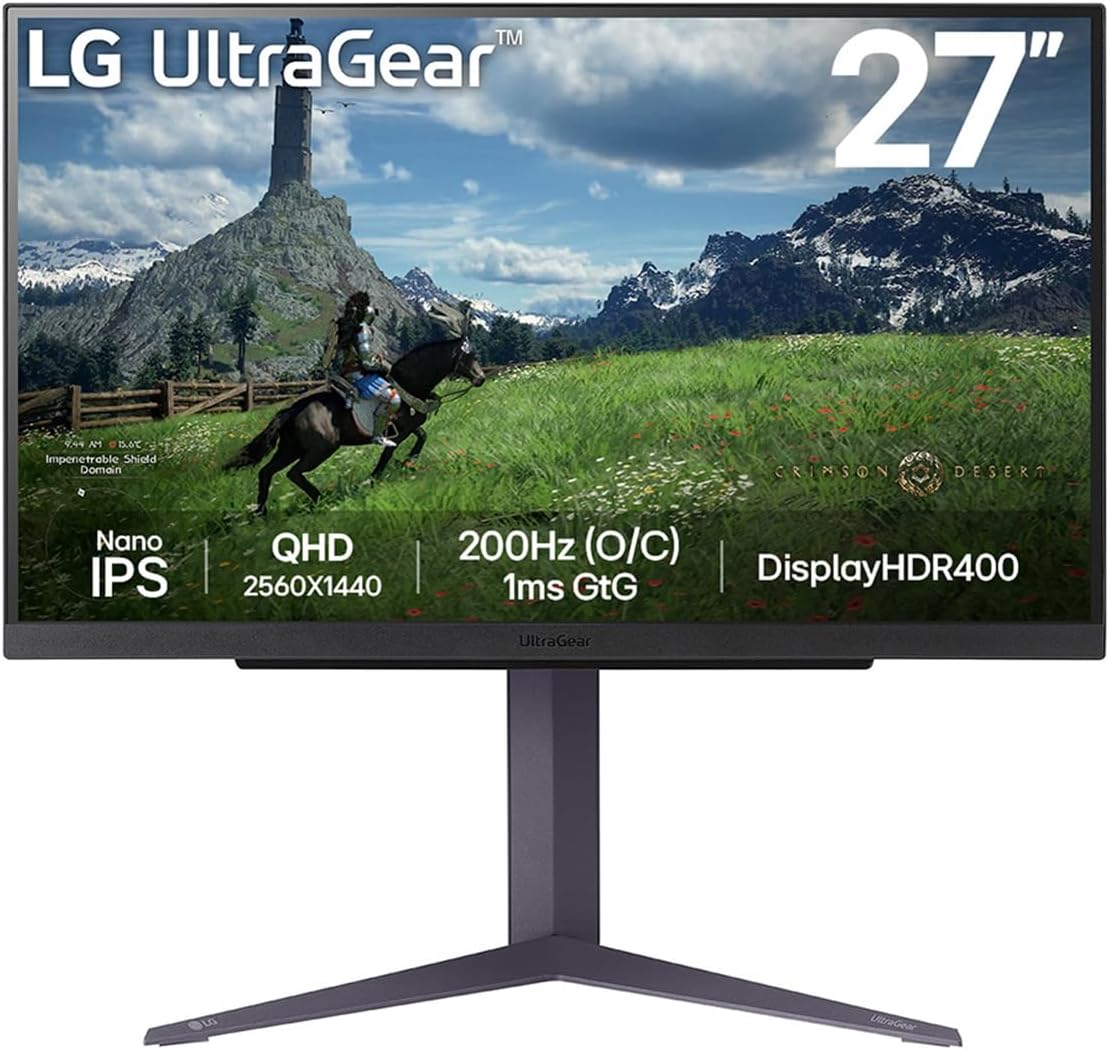
The LG 27GL83A-B UltraGear is a favorite among gamers and content creators who demand exceptional color accuracy without sacrificing gaming performance. This 27-inch IPS monitor delivers stunning QHD resolution (2560×1440) with a native 144Hz refresh rate that can be overclocked to 165Hz. The Nano IPS technology provides a 98% DCI-P3 color gamut, making it perfect for photo editing, video work, and color-critical gaming.
LG’s 1ms Motion Blur Reduction technology ensures smooth, responsive gameplay that rivals TN panels while maintaining the superior viewing angles and color reproduction of IPS. The monitor is NVIDIA G-SYNC compatible and supports AMD FreeSync Premium, eliminating screen tearing across all platforms. With HDR10 support and a sleek virtually borderless design, this monitor looks as good as it performs. The adjustable stand and VESA mount compatibility make setup a breeze.
- Display: 27″ Nano IPS, 2560×1440 (QHD)
- Refresh Rate: 144Hz (overclockable to 165Hz)
- Response Time: 1ms (MBR)
- Color Gamut: 98% DCI-P3
- Special Features: G-SYNC Compatible, FreeSync Premium, HDR10
- Best For: Color-critical work, content creation, premium gaming
- Check prices on Amazon
3. AOC 24G2 – Best Budget 1080p Option
For gamers on a tight budget or those prioritizing high frame rates over resolution, the AOC 24G2 delivers unbeatable value. This 24-inch IPS monitor features Full HD (1920×1080) resolution with a blazing-fast 144Hz refresh rate and 1ms response time. Despite its budget-friendly price, you get premium features like FreeSync Premium support, three-sided frameless design, and excellent color accuracy out of the box.
The IPS panel provides vibrant colors and wide viewing angles, making it perfect for multi-monitor setups. AOC’s Low Input Lag mode and Shadow Control feature enhance competitive gaming performance by improving visibility in dark scenes. The monitor includes both DisplayPort and HDMI connections, and the ergonomic stand offers height, tilt, and swivel adjustments. At this price point, the 24G2 is nearly unbeatable for esports and competitive gaming.
- Display: 24″ IPS, 1920×1080 (Full HD)
- Refresh Rate: 144Hz
- Response Time: 1ms (MPRT)
- Special Features: FreeSync Premium, Low Input Lag, Shadow Control
- Best For: Budget gaming, esports, competitive FPS games
- Check prices on Amazon

4. Dell S2721DGF – Best G-SYNC Performance
The Dell S2721DGF stands out as the best option for NVIDIA GPU owners seeking certified G-SYNC compatibility under $500. This 27-inch monitor combines QHD resolution (2560×1440) with a native 165Hz refresh rate, delivering smooth, tear-free gaming that takes full advantage of modern graphics cards. The Fast IPS panel technology provides 1ms gray-to-gray response time, ensuring minimal ghosting in fast-paced action.
Dell’s build quality shines through with excellent ergonomics, including height, tilt, swivel, and pivot adjustments. The monitor features 99% sRGB color coverage and factory calibration, ensuring accurate colors right out of the box. HDR400 support adds depth to compatible games, while the thin bezels make this perfect for multi-monitor setups. The comprehensive connectivity includes DisplayPort 1.4, two HDMI 2.0 ports, and a USB hub for added convenience.
- Display: 27″ Fast IPS, 2560×1440 (QHD)
- Refresh Rate: 165Hz
- Response Time: 1ms (GTG)
- Color Coverage: 99% sRGB (factory calibrated)
- Special Features: G-SYNC Compatible (certified), HDR400, USB hub
- Best For: NVIDIA GPU owners, professional gaming, multi-monitor setups
- Check prices on Amazon

5. MSI Optix MAG274QRF-QD – Best for Vibrant Colors
The MSI Optix MAG274QRF-QD utilizes cutting-edge Quantum Dot technology to deliver some of the most vibrant and accurate colors available under $500. This 27-inch monitor features Rapid IPS panel technology with 165Hz refresh rate and 1ms response time, making it equally suitable for competitive gaming and content consumption. The Quantum Dot layer expands the color gamut to cover 97% of DCI-P3, providing cinema-grade color reproduction.
MSI has packed this monitor with gaming-focused features including Night Vision technology that brightens dark scenes without overexposing bright areas, and an RGB LED strip on the back for ambient lighting. The monitor supports both FreeSync Premium and G-SYNC compatibility, ensuring smooth gameplay regardless of your GPU choice. With DisplayHDR 400 certification, excellent ergonomics, and USB-C connectivity with 15W power delivery, this monitor excels in both form and function.
- Display: 27″ Rapid IPS with Quantum Dot, 2560×1440 (QHD)
- Refresh Rate: 165Hz
- Response Time: 1ms (GTG)
- Color Gamut: 97% DCI-P3, 100% sRGB
- Special Features: Quantum Dot, Night Vision, RGB lighting, USB-C
- Best For: Immersive gaming, HDR content, vibrant visuals
- Check prices on Amazon

Gaming Monitor Buying Guide 2025
Key Specifications Explained
Refresh Rate: Measured in Hz, this indicates how many times per second your monitor updates the image. Higher is better for gaming, with 144Hz being the sweet spot for most gamers. Competitive players may benefit from 240Hz or higher.
Response Time: This measures how quickly pixels can change colors, typically measured in milliseconds (ms). Lower is better, with 1ms being ideal for fast-paced games to avoid motion blur and ghosting.
Panel Types:
- IPS: Best color accuracy and viewing angles, slight response time disadvantage (now mostly resolved with Fast IPS)
- TN: Fastest response times, poor viewing angles and color reproduction
- VA: Best contrast ratios, moderate response times, good middle ground
Resolution Guide
1080p (Full HD): Best for competitive gaming and budget builds. Easier to drive high frame rates. Recommended for 24″ screens.
1440p (QHD): Sweet spot for gaming in 2025. Great balance of visual quality and performance. Ideal for 27″ monitors.
4K (UHD): Requires powerful GPU, best for 32″+ screens and single-player games.
Adaptive Sync Technology
G-SYNC: NVIDIA’s proprietary technology for eliminating screen tearing. Requires NVIDIA GPU.
FreeSync: AMD’s open standard, works with AMD GPUs and increasingly with NVIDIA cards.
G-SYNC Compatible: FreeSync monitors certified by NVIDIA to work well with their GPUs.
What to Consider Based on Your Gaming Style
Competitive/Esports Gaming: Prioritize refresh rate (240Hz+), response time (1ms), and lower resolution (1080p) for maximum FPS.
AAA Single-Player Games: Focus on resolution (1440p/4K), color quality, HDR support, and larger screen size (27″+).
Multi-Purpose Use: Balance refresh rate (144-165Hz), resolution (1440p), and color accuracy. IPS panels recommended.
Frequently Asked Questions
Is 144Hz worth it over 60Hz?
Absolutely! The difference between 60Hz and 144Hz is night and day. Games feel significantly smoother, more responsive, and competitive gameplay improves dramatically. Once you experience 144Hz, it’s hard to go back.
Do I need G-SYNC or FreeSync?
Adaptive sync technology is highly recommended for gaming. It eliminates screen tearing and stuttering, creating a smoother experience. Most modern monitors support both or are cross-compatible, so don’t worry too much about which specific technology.
Is 1440p better than 1080p for gaming?
Yes, if your GPU can handle it. 1440p provides noticeably sharper image quality than 1080p, especially on 27″ monitors, while still being easier to drive than 4K. It’s the sweet spot for modern gaming in 2025.
What size monitor is best for gaming?
For 1080p, stick to 24″. For 1440p, 27″ is ideal. For 4K, consider 32″ or larger. Larger screens at lower resolutions can look pixelated, while smaller screens at high resolutions waste the extra detail.
Do I need HDR for gaming?
HDR is a nice bonus but not essential, especially at the sub-$500 price point where HDR400 is common. True HDR requires HDR600 or higher for a meaningful difference. Focus on refresh rate, resolution, and response time first.
Final Recommendations
The gaming monitor market in 2025 offers incredible value, with previously premium features now available in the sub-$500 range. Our top pick, the ASUS TUF Gaming VG27AQ, delivers exceptional all-around performance with its QHD resolution, 165Hz refresh rate, and excellent build quality. For those prioritizing color accuracy, the LG 27GL83A-B UltraGear can’t be beaten with its Nano IPS panel and 98% DCI-P3 coverage.
Budget-conscious gamers will find tremendous value in the AOC 24G2, offering competitive-level performance without breaking the bank. NVIDIA users should seriously consider the Dell S2721DGF for its certified G-SYNC compatibility and factory calibration. Finally, if you want the most vibrant, eye-catching visuals, the MSI Optix MAG274QRF-QD with Quantum Dot technology delivers cinema-grade colors.
Whichever monitor you choose from this list, you’re getting exceptional gaming performance that will elevate your experience. Remember to consider your GPU capabilities, gaming preferences, and desk space when making your final decision. Happy gaming!
The shortlist, monthly
What changed, what dropped in price, and what we would buy now. No spam.
- 01 VRR Range Explained: Why the Low End of a Monitor’s Sync Range Matters 3 min
- 02 Best 4K Gaming Monitors UK 2026: The Ultimate Resolution Guide 5 compared 4 min
- 03 Best 240Hz Gaming Monitors UK 2026: Competitive Edge Guaranteed 5 compared 4 min
- 04 Best Gaming Monitors with OLED Panels (2026): The Ultimate Guide 5 compared 12 min